GST Number Search & Verification Tool
Verifying the authenticity of a supplier's or buyer's GST number has never been more important, or more straightforward. The ExpressGST GST Number Search & Verification Tool gives you instant access to real-time GST registration details so you can do a thorough GST search and check any GST number in seconds, right from your browser.
Whether you have the 15-digit GSTIN, only the PAN of the business, this free tool lets you verify the GST number, confirm registration status, and access key compliance details, all in one place. It is trusted by CAs, tax practitioners, and finance teams across India who need a reliable, fast GST number check without navigating the official government portal every time.
What is a GSTIN? – GST Number Format, Full Form & Meaning
GSTIN, short for Goods and Services Tax Identification Number, is the unique 15-character alphanumeric code issued to every business registered under GST in India. Think of it as the GST identity of a business, much the same way a PAN is the income-tax identity of an individual taxpayer.
Every GST-registered entity, whether it is a trader, manufacturer, service provider, exporter, or e-commerce seller, must hold a GSTIN and quote it correctly on all tax invoices, purchase orders, GST returns, and official communications. The GSTIN is central to everything that happens in GST compliance, from filing GSTR-1 and GSTR-3B returns to claiming input tax credit (ITC), generating e-way bills, and issuing e-invoices. Without a valid GSTIN, a business simply cannot operate within the formal GST framework.
Understanding the GST Number Format: 15-Digit GSTIN Structure Explained
Knowing the structure of a GSTIN helps you spot errors immediately and understand the information it carries. A valid GSTIN is always 15 characters long, and each character has a defined meaning:
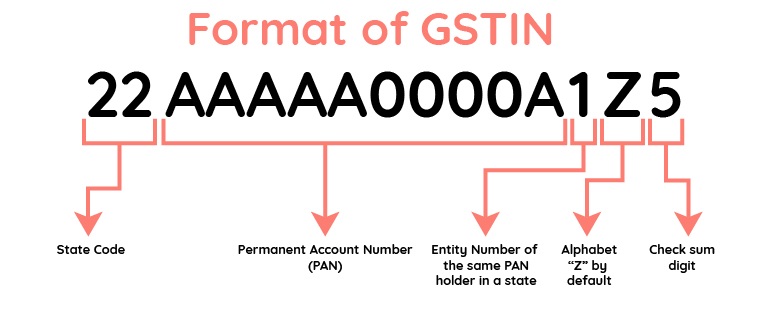
- First 2 digits: A numeric state code based on the Census of India — for example, 27 for Maharashtra, 09 for Uttar Pradesh, 07 for Delhi, and 08 for Rajasthan.
- Next 10 characters (3rd to 12th): The PAN of the registered business or proprietor. This is what links the GSTIN directly to the taxpayer's identity.
- 13th character: A numeric or alphanumeric entity count indicating how many registrations exist for that PAN in the same state — '1' for the first registration, '2' for the second, and so on up to '9', after which alphabets (A, B, C…) are used.
- 14th character: A taxpayer-type code. 'Z' is used for regular taxpayers, which covers the vast majority of GST registrations. Other values like 'F' (Composition Scheme), 'G' (Input Service Distributor), 'D' (TDS deductor), and 'C' (TCS collector) indicate specific registration categories.
- 15th character: An alphanumeric checksum character that is system-generated based on the preceding 14 characters. It helps software and portals detect errors in the GSTIN format instantly.
As a quick initial sanity check, you can compare characters 3–12 of the GSTIN with the supplier's PAN to confirm the format is consistent. However, this only confirms structural alignment, it does not tell you whether the GSTIN is active, genuine, or correctly registered. For that, you need a proper GST number check through a live verification tool or the official GST portal.
Multiple GST Numbers Under One PAN: Why They Exist
It is entirely common, and sometimes mandatory, for a single business to hold more than one GSTIN under the same PAN. This happens in two main situations:
Multi-state operations: GST is a destination-based tax with both state and central components (SGST and CGST). Every state or union territory where a business has a physical presence, a branch, warehouse, office, or depot, requires a separate GST registration. So a company with presence in Delhi, Maharashtra, and Karnataka will have three distinct GSTINs, one for each state.
Multiple places of business or distinct verticals within the same state: Under Section 25(2) of the CGST Act (as amended in 2019), a business can also obtain separate GST registrations within the same state for each place of business or distinct business vertical, subject to prescribed conditions. This supports cleaner tax reporting and ITC management per unit or division.
Under GST law, each registration is treated as a distinct person for all compliance purposes, even if multiple registrations share the same PAN or even the same registered address, provided the conditions for separate registration are met and properly documented. This is precisely why a PAN-based or name-based GST number search is so valuable for finance teams, CAs, and compliance officers managing multiple GSTINs across states and entities.
Managing compliance for multiple GSTINs?
ExpressGST makes multi-GSTIN filing, reconciliation, and compliance effortless, all in one platform.
Start Free Trial →Why Verifying a GST Number Before Every Transaction is Critical?
Doing a GST number check before you transact is not just a best practice, it is an essential step in protecting your business. Here is why:
Confirm vendor legitimacy: Before booking an invoice, verifying the supplier's GSTIN confirms they are legitimately registered under GST and their registration is currently active. A cancelled, suspended, or non-existent GSTIN is a red flag that should stop any transaction.
Prevent fraudulent transactions: Unscrupulous entities sometimes misuse fake GSTINs or create bogus invoices to evade tax or inflate ITC claims. A simple GST verification at the time of onboarding can protect your business from being a party to such fraud.
Protect your input tax credit (ITC): ITC is only available on purchases from GST-registered and return-filing suppliers. If you book invoices against an invalid, inactive, or fraudulent GSTIN, your ITC claim can be denied or reversed, resulting in real financial loss and potential scrutiny.
Streamline vendor and customer onboarding: A quick GST search by GSTIN, PAN, or name speeds up due diligence for new vendors, dealers, and customers, giving your team one more layer of confidence before committing to a commercial relationship.
Stay audit-ready: Maintaining a clean audit trail that includes verified GSTINs for all parties makes GST audits and assessments significantly smoother and reduces the likelihood of department queries.
How to Search & Verify a GST Number Online – 2 Easy Methods?
You can verify a GST number through the official government portal or through a trusted third-party tool like ExpressGST that connects securely to official GST systems. Both methods are reliable; the difference lies in speed, ease of use, and the depth of information presented.
Method 1: GST Number Search on the Official Portal (gst.gov.in)
- Open the official GST portal at www.gst.gov.in.
- Navigate to "Search Taxpayer" and select "Search by GSTIN/UIN".
- Enter the complete 15-digit GSTIN and solve the captcha shown on screen.
- Click "Search" to view the basic registration details associated with that GSTIN, including legal name, state, registration date, status, taxpayer type, and business constitution.
- The official portal is the authoritative source for GSTIN data. However, it can experience latency or downtime during peak periods, which is where a faster, API-based third-party tool like ExpressGST becomes particularly useful.
Method 2: Using the ExpressGST GST Number Search Tool
ExpressGST's GSTIN verification tool uses secure, authorized API connectivity to official GST databases to deliver live results instantly, without the waiting times or interface complexity of the government portal. Beyond a basic GSTIN lookup, it also supports:
- PAN-based GSTIN search, to find all GST numbers registered under a particular PAN across different states.
- Business-name-based GST search, to find and verify GST numbers when you only have the company's registered or trade name.
Don't just verify. Stay fully compliant
From GSTIN search to GSTR filing, ITC reconciliation, and e-way bill generation — ExpressGST covers your entire GST compliance cycle
Book Free Demo →What is a GST number search & verification tool?
A GST number search and verification tool is an online utility that lets you run a live GST search, verify GST number validity in real time, and pull key registration details from official GST systems, all through a clean interface without needing to log in to any government portal.
When you run a GST number check, the tool typically retrieves:
- Legal name of the business as registered under GST.
- State and union territory of registration.
- Business constitution (proprietorship, partnership, LLP, private limited company, etc.).
- Taxpayer type (Regular, Composition Scheme, SEZ Unit, etc.).
- GSTIN status, Active, Cancelled, or Suspended, and the effective date of registration.
- Jurisdiction details including zone, circle, ward and commissionerate.
Some advanced tools may additionally surface HSN or SAC service codes associated with the business, indicative filing history, or Aadhaar/e-KYC authentication status, depending on the data made available through the GST system's APIs.
3 Ways to Do a GST Number Search: By GSTIN, PAN, or Business Name
Recognizing that different users have different starting points, modern GST number search tools support three distinct search modes. The ExpressGST GSTIN Search & Verification Tool supports all three:
GSTIN-based verification, The most direct method. Enter the 15-character GSTIN and get instant verification results including status, name, type, and jurisdiction.
PAN-based GST number search, Use the 10-character PAN to retrieve all GSTINs registered under it across states, making this indispensable for businesses with multi-state presence or for CAs managing multiple clients under the same PAN.
Business-name-based GST search, Type the legal or trade name of the entity and browse matching results to identify and confirm the correct GST number. Particularly helpful when a supplier hasn't shared their GSTIN but you know who they are.
How to use the ExpressGST GST Number Search Tool
ExpressGST's GSTIN Search & Verification Tool is designed to be intuitive even for first-time users, while being robust enough for daily professional use by CAs and enterprise finance teams dealing with dozens or hundreds of GST numbers at a time.
A. GST Number Search by GSTIN (Step-by-Step)
- On the tool page, select the "GSTIN" search mode.
- Enter the complete 15-digit GST number you want to verify.
- Click the "Check" or "Verify" button.
If the GSTIN is valid and active, your results will display the legal name, state, GSTIN status, taxpayer type, business constitution, and date of registration.
If the GST number entered is invalid or does not exist in the GST system, the tool will immediately flag the error so you can correct and re-verify before using it on an invoice or return.
B. GST Number Search by PAN Number
- Switch to the "Search by PAN" mode within the tool.
- Enter the 10-digit business PAN.
- Click the "Check" or "Verify" button.
The tool returns a list of all GSTINs registered under that PAN, along with their respective states and current status.
This search mode is especially valuable for businesses that operate across multiple states and need a single-screen view of all their GST registrations, or for professionals who need to verify a client's full GST footprint.
Features of the ExpressGST GST Number Search & Verification Tool
ExpressGST's online GST number search and GSTIN verification tool is built with a robust architecture and thoughtful feature set that supports high-volume search and verification without delays or data quality compromises. It is designed to meet the repeated, daily needs of finance teams, CA firms, and compliance officers who cannot afford to work off stale or unreliable GST data.
Instant GST number verification: Perform a live GST number check in a single click, with results fetched in real time from official GST systems, no lag, no stale data, no manual lookups.
Two-way search flexibility: Verify by GSTIN, or search GST number by PAN, whichever starting point suits the task at hand.
Rich, comprehensive business details: Beyond basic status, view the full legal name, trade name, principal place of business, complete jurisdiction (Zone, Commissionerate, Division, Circle, Ward, Range), constitution of business, taxpayer type, date of registration, nature of business activities, HSN/SAC service codes, Aadhaar authentication status, e-KYC verification status, and GST return filing frequency.
Real-time, secure API connectivity: All searches go through secure, authorized API calls to official GST databases, ensuring data is current, sourced from the right place, and handled without storing sensitive GSTIN or PAN information unnecessarily.
Designed for professional scale: The clean, tab-based interface reduces clicks and minimizes errors for users handling multiple GST number checks in a session, whether you're a one-person CA practice or a large enterprise finance team.
Seamless integration with ExpressGST workflows: As part of the broader ExpressGST ecosystem, the GSTIN Search Tool connects naturally with your GST return filing, reconciliation, and multi-GSTIN compliance workflows, so a verification doesn't have to stay siloed from the rest of your compliance process.
You've done the GST number check. Now take the next step.
Join thousands of CAs, and tax practitioners who trust KDK Spectrum Cloud for end-to-end GST compliance for all their clients.
Start Free on Spectrum Cloud →Advantages of using ExpressGST for GST number check
The ExpressGST GST number search and verification tool is more than just a lookup box. Used as a regular part of your GST compliance workflow, it delivers compounding value across your tax, finance, and vendor management operations.
Stronger GST compliance, every transaction: Verifying a GST number before booking an invoice means your records are consistently backed by active, valid GSTINs, reducing the likelihood of compliance notices and audit queries.
Fraud prevention at the very first step: Catching a fake, cancelled, or mismatched GST number before you transact is always better than discovering the problem during a GST audit or ITC reconciliation. The tool acts as a first line of defence against fraudulent vendor registrations.
Better ITC flow and fewer reversals: Transactions backed by verified, active GSTINs tied to return-filing suppliers give you a much stronger foundation for ITC claims, reducing the risk of reversals, demand notices, or blocking during annual reconciliation.
Faster vendor onboarding and due diligence: A quick GST search by number, or PAN, lets your procurement and accounts teams complete standard GST verification as part of every vendor onboarding cycle, without delays, without escalations.
One tool, multiple verification methods: Whether you're a first-time user checking a single vendor or a CA running multiple checks for clients across industries, the tool's two search modes adapt to your workflow rather than the other way around.
When used alongside the full ExpressGST platform, this tool also feeds naturally into bulk verification, multi-GSTIN dashboards, and integrated reconciliation, making it a meaningful part of an end-to-end compliance toolkit, not just a standalone lookup.
Frequently Asked Questions
No. GST registration through the official government portal at www.gst.gov.in is completely free of any government fee. There are no charges levied by the GST department for processing or issuing a GSTIN. That said, if you choose to engage a CA or tax professional to assist with the registration process, their service charges would apply separately.
To apply for a GST number online: 1) Visit www.gst.gov.in and click on 'Register Now' under the Taxpayers section. 2) Select 'New Registration' and fill in Part A with your PAN, email, and mobile number. 3) Verify using OTP sent to your email and mobile. 4) Fill in Part B with business details, documents, and authorised signatory details. 5) Submit the application. You will receive your GSTIN within 3–7 working days after successful verification.
Yes. A single PAN can have multiple GSTINs registered across different states or union territories. Using the ExpressGST GST Number Search Tool, you can enter a PAN number to retrieve all GSTINs associated with it, helping you verify all registrations linked to a business entity.
A GST number search reveals the following details: legal name of the business, trade name, registration status (Active/Cancelled/Suspended), taxpayer type (Regular, Composition, etc.), date of registration, principal place of business, nature of business activities, and the state jurisdiction. This information is fetched in real time from the official GST portal.
After submitting a complete GST registration application on the government portal, a GSTIN is typically allocated within 3 to 7 working days. In cases where additional documents or clarifications are requested by the tax officer, it may take up to 30 days.
Yes. Under Section 25(2) of the CGST Act (as amended in 2019), a business can obtain separate GST registrations within the same state for each place of business or distinct business vertical, subject to prescribed conditions and documentation. Each registration is treated as a distinct person under GST law, even if registrations share the same PAN or address.
Yes. If two or more separate legal entities, each with its own PAN, operate from the same address, each can independently register for GST at that address. Each registration remains distinct and is treated separately for all compliance, filing, and tax purposes.
If you come across a GSTIN that appears fake, is being misused, or if you find an unauthorized GST registration under your own PAN, you can take action through the GST portal. Use the 'Search Taxpayer by PAN' feature to see all registrations under your PAN, and then use the 'Report' option against any registration that does not belong to you. You can also raise a formal complaint through the GST Grievance Portal or directly contact your jurisdictional GST officer with supporting documents and evidence. Authorities will investigate and take appropriate action, which may include cancellation of the GSTIN or imposition of penalties.
A GST number (GSTIN) is central to almost every formal business activity under India's GST framework. It allows businesses to legally collect and remit GST, issue compliant tax invoices, file GST returns, claim Input Tax Credit (ITC), and trade across state boundaries without restrictions. A valid GST number also enables businesses to participate in e-invoicing and e-way bill systems, which are mandatory above certain transaction thresholds.
When you enter a GSTIN in the ExpressGST GST Number Search tool, the result includes the legal name of the registered entity. For a sole proprietorship, this typically reflects the proprietor's name as registered under GST. You can confirm this alongside the constitution of business field in the results.
